
Description
Renko liquidity sweeps, calculated inside the EA
EA #003 — Renko Liquidity v2.21 is a MetaTrader 5 Expert Advisor with an internal fixed-box Bid-tick Renko engine. It detects a confirmed pivot sweep and optional reclaim, checks the enabled filters and submits orders at real broker Ask/Bid quotes. No custom Renko indicator or external engine file is required.
BUY and SELL logic
BUY: the signal low sweeps below the latest confirmed pivot low within the configured minimum/maximum depth. With reclaim enabled, its close must be strictly above the pivot plus the reclaim buffer. SELL mirrors this above the latest pivot high. The signal body’s direction is not a separate entry requirement. Renko fast SMA above slow permits BUY; below permits SELL. Optional brick speed, closed higher-timeframe MA, broker hours and spread protection can restrict entries.
A qualifying final brick of the current tick enters at real Ask/Bid. A qualifying intermediate brick created during a fast tick arms a retrace to its signal close. The retrace can fill while no more than three newer completed bricks exist; it expires after that. The robot does not assume execution at a synthetic Renko close that was never available.
Risk controls and exits
The source default is 0.50% of equity per trade; fixed lot sizing is optional. The supplied US100 example uses 2.00% equity risk. BUY SL is below the signal low minus 0.25 box; SELL SL is above the signal high plus 0.25 box. Broker minimum distance and tick size can move the stop farther. Percentage volume uses the actual stop and is rounded down to the broker step.
Positions close after one or two opposite completed Renko bricks or the hard broker SL. There is no fixed TP, trailing stop, partial close or pyramiding. The EA identifies positions by symbol and magic; a netting account blocks a new entry when any position exists on that symbol. Use distinct magic numbers for independent instances. Broker SL remains after shutdown; the Renko market exit needs MT5 and the EA running. Gaps, slippage and costs can exceed nominal risk.
Configuration: defaults versus the supplied US100 example
| Input | Source default | US100 report SET |
|---|---|---|
| Renko box (symbol points) | 200 | 150 |
| Classic two-box reversal | On | On |
| Liquidity lookback / pivot left-right | 20 / 1-1 | 50 / 1-4 |
| Sweep minimum–maximum (boxes) | 0.90–1.00 | 1.00–1.50 |
| Reclaim buffer / require close inside | 0.30 / On | 0.00 / On |
| Renko SMA fast / slow | 50 / 160 | 80 / 275 |
| Opposite bricks to exit | 1 | 2 |
| Equity risk | 0.50% | 2.00% |
| Warmup days / tick cap | 30 / 5,000,000 | 30 / 5,000,000 |
| Speed / higher-TF / hours / spread filters | Off | Off |
All 58 inputs and dependencies are documented in the English manual. Box points depend on the broker’s SYMBOL_POINT; they are not automatically pips. The native H1/H4 chart timeframe does not set the Renko signal timeframe. Warmup and tick-history availability affect anchoring and early signals.
Supplied historical MT5 backtest
US100.pro · OANDA TMS Brokers S.A. · H1 host chart · 2025-01-01 to 2025-11-15 · USD 50,000 initial deposit · 1:100 leverage. MT5 reports 100% real-tick history and 79,106,249 ticks. The exported report does not separately state the tester modeling selection or a fixed spread setting. Explicit modeling selection and spread assumptions: not provided in source report. Commission and swap entries in the supplied Deals table are zero; this is not a promise of zero live costs.
Reported net profit: USD 121,405.26; final balance: USD 171,405.26; profit factor: 1.48; maximum relative equity drawdown: 32.72% (USD 32,376.68); 362 trades, 135 winners (37.29%); expected payoff: USD 335.37. There are 724 trading deals, plus the initial deposit row. The balance curve is rebuilt from the report; it is not tick-by-tick equity.
The supplied SET matches every report input. Deal profit, commission and swap totals reconcile to every recorded balance and the final result. This is one historical configuration on one broker feed. Unseen-data validation, independent reruns, live/demo activation checks and visual/nonvisual parity were not performed during this publication. The EX5 and source are supplied v2.21 files; the code was not modified or independently recompiled here.
Original report diagnostics


Real MT5 interface examples

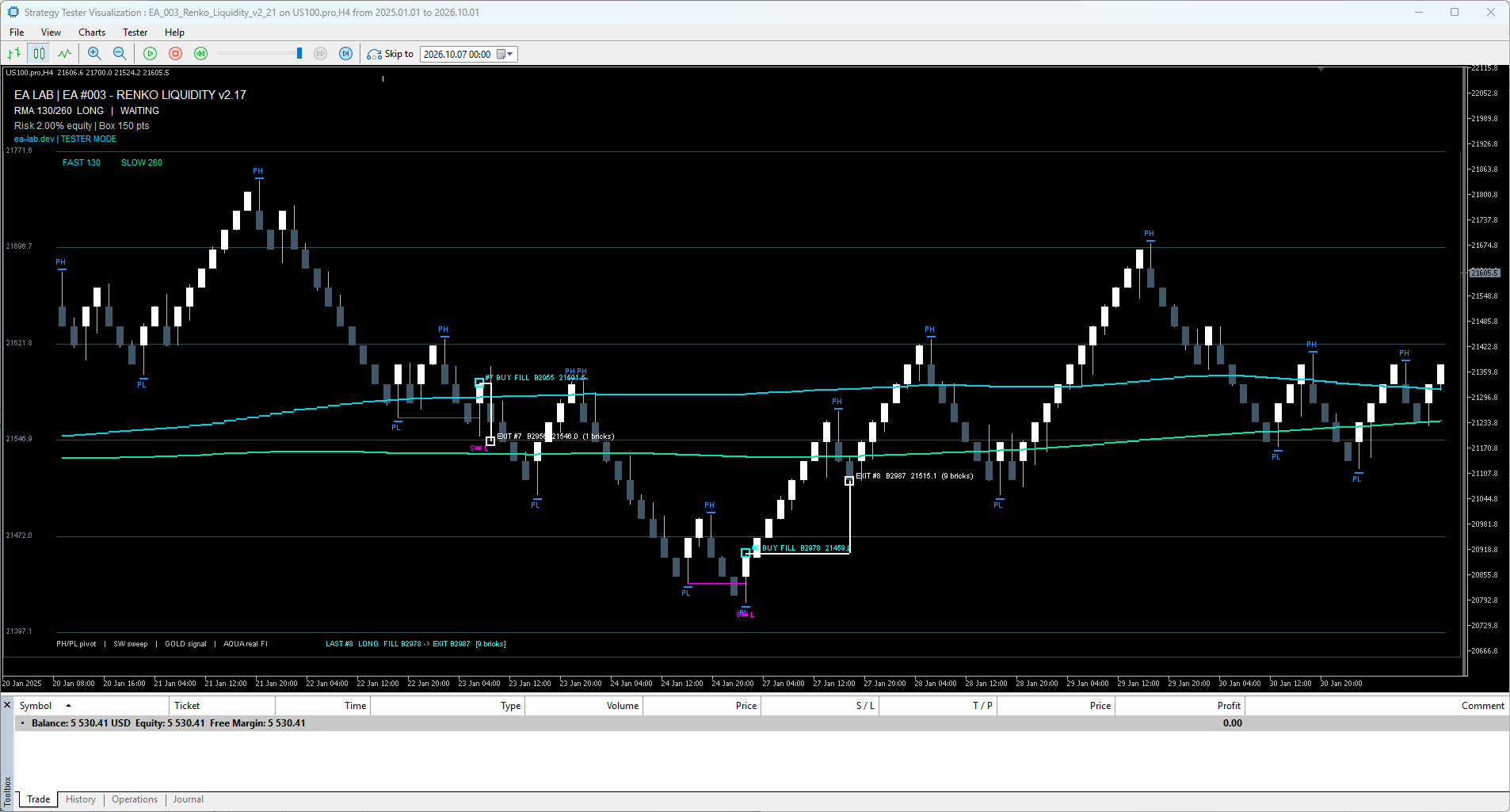
These are interface examples. Their SMA 130/260 settings are different from the supplied report SET’s 80/275. The v2.21 source retains a cosmetic v2.17 on-chart title; identify the version by the selected EA file.
What you receive
A protected customer ZIP containing the compiled v2.21 EX5, matching US100 example SET, English user manual, Quick Start PDF, START_HERE, changelog and the original MT5 report with all four report images. MQ5/MQH source is excluded. Your EA003 license is issued with the paid order and supports two MT5 account/server combinations.
Install and activate
- Extract the ZIP and copy EX5 into File → Open Data Folder → MQL5 → Experts. Refresh Navigator.
- Attach the robot to the real broker symbol. Load the example SET only after checking symbol points, contract size, volume and the 2% risk setting.
- Allow https://ea-lab.dev in Tools → Options → Expert Advisors → WebRequest. Enter the product-specific order key in InpLicenseKey.
- Enable Algo Trading and the EA trading permission. Check LICENSE ACTIVE before demo/live operation.
- Run real-tick tests and unseen-data checks, then observe on demo before considering live use.
Manual optimization workflow
- Confirm operation: one real-tick test, realistic costs, recorded warmup and fixed risk. For startup timing only, try 3 days / 250,000 ticks and compare against the full warmup.
- Tune related inputs: box, lookback, pivot wings and sweep/reclaim; then SMA periods. Keep Fast < Slow and minimum sweep ≤ maximum sweep. Select checkboxes and Start/Step/Stop manually.
- Validate robustness: compare exits and optional filters, sub-periods, nearby parameters and a separate unseen period. Review trade count and drawdown alongside profit. Suggested label ranges are research guidance, not validated limits.
Version 2.21
Capped block-wise warmup, input-label optimizer guidance, manual range selection and validation of active inputs. Automatic optimizer profiles and arbitrary optimization-only caps are removed. The internal sweep/reclaim, bounded retrace, hard SL and opposite-brick exit remain documented. This publication preserves the supplied strategy and binary.
Frequently asked questions
Do I need an external Renko indicator?
No. The Renko engine and its SMAs are internal. The optional higher-timeframe MA uses native MT5 functionality.
Does the Strategy Tester need a license or use an activation slot?
No. Tester and optimization use TESTER MODE with no online activation. Demo/live charts require the EA003 purchase key.
What counts as one of the two activations?
An MT5 account login plus its server. A different server is a different combination. Keys for other robots cannot unlock EA003. Contact ea@ea-lab.dev for activation support.
What happens if the license server is unavailable?
Normal checks occur at startup and every 24 hours. Network failures may use up to 72 hours from a prior valid check for the same product/account/server/key. Explicit rejection grants no grace. Existing owned positions remain managed when new entries are blocked.
Why does a sweep marker not open a trade?
A structural marker may fail filters, retrace conditions, hours, spread, license, lot sizing, ownership or broker checks. Inspect Journal/Experts. A generic incorrect-input message requires checking active parameter combinations in a single test.
Will it work on another broker or instrument?
The engine is configurable, but only the supplied US100.pro historical case is shown. Tick feeds, symbol Point, spreads, costs, contracts and execution differ. Each broker/symbol needs separate testing.
Does it use Stochastic divergence?
No. Read the Renko Liquidity strategy guide for the method, or compare EA001 Renko Divergence.
Understand the Renko Liquidity strategy
Read the Renko Liquidity sweep and reclaim strategy guide for the confirmed pivot rules, BUY and SELL Renko setups, fast-tick retrace, stops, exits and worked chart examples. Then return to this product page to compare the EA #003 configuration, historical test evidence and download package.
Read the EA003 Renko Liquidity strategy
Risk disclosure
Trading can result in partial or total loss of capital. No return is guaranteed. Historical backtests, screenshots and example presets do not predict future results. You select the broker, configuration, risk and trading decisions. Read the Risk Disclosure and Terms of Use. Support: ea@ea-lab.dev.


